OMG! Ubuntu — Linux — Wed, 26 Aug 2026 16:07:42 +0000
Summary
The Document Foundation has released LibreOffice 26.8 for Windows, macOS, and Linux, headlined by a new Paragraph Composer in Writer that balances spacing across multiple lines for better-looking justified text. The update adds native variable OpenType font support, automatic detection of right-to-left paragraph direction in Writer and Calc, and a Draft view that hides headers, footers, and margins, while Calc gains Calculated Fields in pivot tables, a shuffle command, and a fix for a bug that damaged newer Excel chart types when files were round-tripped. Impress and Draw now support multiple page sizes in a single document, slides can be organized into named groups, and colorful Notebookbar backgrounds can be applied without restarting the app. The Document Foundation also reaffirmed its "deliberate position" against adding generative AI features, stating that no component requires network access and documents are never transmitted to remote services. LibreOffice 26.8 is available from the official website as well as via Snap, Flatpak, and PPA, and will be included in Ubuntu 26.10 in October.
The Document Foundation has released LibreOffice 26.8, a major new version of the open-source office suite for Windows, macOS and Linux.
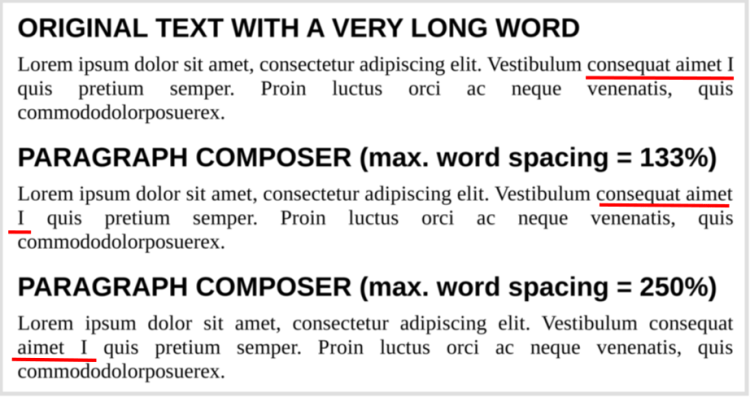
Among the changes is a new Paragraph Composer. This improves the way Writer handles justified text. In many word processors, justified text is stretched to create straight edge on both sides of the page, but this can look uneven. Some lines packed tight, others gappy.
But with LibreOffice 26.8’s new Paragraph Composer, spacing gets balanced several lines at once, rather than one at a time, which can result in a better overall look:
Other typography changes in LibreOffice 26.8 include native support for variable OpenType fonts, letting you tweak “axes that adjust letterform contrast and proportion to the size at which text is set”. Baseline grid alignment was added for text in frames too.
Right to left, such as LibreOffice now detects the direction of a document automatically when it is opened or pasted in, rather than requiring the user to set it manually, and Calc, the suite’s spreadsheet tool, sets cell text direction automatically if right-to-left text is entered.
And there’s better support for other kinds of languages, including those written right to left, such as Arabic and Hebrew, through the suite:
“None of this work has a commercial market”, The Document Foundation said, noting it did it because it have to justify features based on return. A circular argument, somewhat, but the sentiment hold: FOSS can focus on what matters, more than what pays.
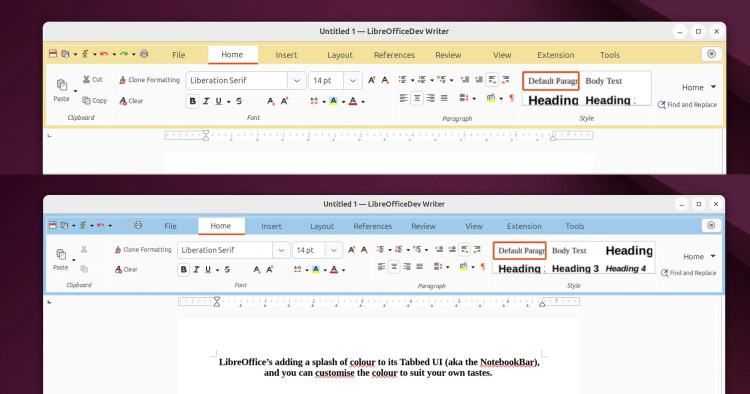
LibreOffice 26.8 adds the colourful Notebookbar background options I reported on in June. These are intended to make it easier to tell apps apart, but it also looks fresher in my opinion.
Changing theme colours no longer requires an application restart, which is a big timesaver when you fancy exploring the customisation options.
Interoperability (boring word) is always a hungry area of improvement. People may opt for LibreOffice but still need to share files with colleagues and collaborators who use Microsoft Office, and vice versa.
In Calc, LibreOffice 26.8 nixes a quirk that damaged some newer chart types in Microsoft Excel documents that were opened and edited in LibreOffice, then opened again in Excel. LibreOffice still can’t handle those charts, but it no longer screws ’em up!
More Calc improvements:
Writer also offers:
Changes to Draw and Impress in LibreOffice 26.8:
And more generally:
LibreOffice’s database tool, Base, is often overlooked.
In v26.8, database users can now filter enters by date and time using the Firebird engine. Comments are also now written into SQL code, and persist if switched to Design View.
Developers can build and modify Python scripts inside the app without the use of additional tools. Script commands can call internal system functions directly, and tools in the ScriptForge library simplify array handling.
One thing you won’t find in LibreOffice 26.8 are generative AI features. While other suites, like ONLYOFFICE, now offer cloud (or local) LLM hookups, The Document Foundation says it has taken a “deliberate position” not to follow suit.
“Documents are not transmitted to remote services for processing, and no component of the suite requires network access to function”, it said.
“Any organisation handling confidential, legally privileged or personal data needs to know where that data goes, and the only assurance that survives an audit is that it does not leave the machine.”
Download LibreOffice 26.8 from the official website. It has builds for Windows, macOS and Linux, including a DEB package that works on Ubuntu.
If you prefer automated updates, the LibreOffice Snap and the Flathub package are better choices, or you could make use of the LibreOffice Fresh PPA (but it can take a while to be updated with new versions).
Ubuntu doesn’t “backport” new LibreOffice versions to older LTS releases. If you use 26.04 or earlier and you want the newest features, opt for the Snap, Flatpak or PPA version.
LibreOffice 26.8 will be included in Ubuntu 26.10, out in October.
Original article: https://www.omgubuntu.co.uk/2026/08/libreoffice-268-released Source: OMG! Ubuntu