r/homeassistant — Smart Home — 2026-08-28T22:58:48+00:00
Summary
A Reddit user with no prior coding, Linux, or Raspberry Pi experience built a 22-inch wall-mounted smart home panel after discovering Home Assistant just two months earlier. The setup uses a UPERFECT 22" display connected to a Raspberry Pi 5 that boots directly into Chromium in kiosk mode, showing a custom Home Assistant dashboard for controlling climate, lights, blinds, cameras, alarm, pool, energy, and more. The user originally tried an Iiyama touchscreen but found it too large for the space. To avoid running the display 24/7, they manage standby by cutting the HDMI signal from the Pi, which causes the monitor to enter standby and automatically wake when the signal returns, and they configured a screensaver pulling photos from their Immich library so the panel doubles as a digital photo frame. The user asked the community how others handle display standby, including options like DDC/CI or presence sensors.
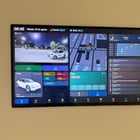
Two months ago, I didn’t know what Home Assistant was. I didn’t even know what a NAS was. And until about two weeks ago, I had never touched a Raspberry Pi. I had never written code, never really used Linux, and honestly, a lot of the things that have somehow become part of my daily life lately were things I didn’t even know existed. And somehow… I ended up here. 😅 After seeing so many of your wall panel setups on this subreddit over the past few weeks, I decided to try building my own. My original plan was to use an Iiyama touchscreen. I actually tried it, but once I saw it in the space, it just felt too big and didn’t quite fit the way I wanted. I had already seen a few people here using UPERFECT displays with Raspberry Pis, so I decided to give one a try. I ended up going with a 22” UPERFECT, and it fits the space so much better. It’s connected to a Raspberry Pi 5 that boots straight into Chromium in kiosk mode, displaying a Home Assistant dashboard I’ve been building specifically for this screen. The idea was to create one central place where we can quickly see what’s happening around the house and control the things we actually use: climate, lights, blinds, cameras and doorbell, alarm, garden and pool, energy and solar production, the car, calendars, weather, etc. I also didn’t want a 22” monitor sitting fully on 24/7. After playing around with it, I discovered that if I cut the HDMI signal, the UPERFECT shows “No Signal” for a few seconds and then goes into standby. As soon as the HDMI signal comes back, the display wakes up automatically. So that’s how I’m currently managing standby from the Raspberry Pi. After a period of inactivity, the display goes to sleep and can wake up again when needed, without ever having to physically access the monitor’s power button. I’ve also set up a screensaver using photos from my Immich library, so when the display is on but we’re not actively using Home Assistant, it doubles as a digital photo frame. I’d be really interested to know how those of you with similar wall panels handle this. Do you also control standby through the HDMI signal? DDC/CI? Presence sensors? Something completely different that you’ve found to be more reliable? I’m still learning — a lot — and I’m sure there are plenty of things someone with more experience would have done differently. But considering that two months ago I didn’t even know what Home Assistant was, and two weeks ago I had never touched a Raspberry Pi, I feel like I’m learning at an absolutely ridiculous pace. 😅 And yeah… this rabbit hole is deep. I’ve added a few photos of the setup and some of the different views. Any ideas, suggestions, or things you think I could improve are more than welcome! submitted by /u/Strange_Condition326 [link] [comments]
Original article: https://www.reddit.com/r/homeassistant/comments/1w15ns1/two_months_ago_i_didnt_know_what_home_assistant/ Source: r/homeassistant